05 Errors & recovery · Blocked-action explanation
When the agent is blocked, it says what, why, and how to unblock it
GitHub Copilot cloud agent · Pull request (web)
The insight
Report a blocked action as a receipt (what was blocked, which command, the two narrowest ways forward) so a security control reads as a next step, not a failure.
Documented
from the sourceVisible in the image: A Warning callout reads 'Firewall rules blocked me from connecting to one or more addresses'. Expanded, it lists the blocked host (packages.contoso.corp), the triggering command (apt-get install ruby-full, 'http block'), and two links: 'Configure Actions setup steps … which run before the firewall is enabled' and 'Add the appropriate URLs or hosts to my firewall allow list'.
- When a request is blocked by the firewall, the warning is added to the pull request body (new PRs) or to a comment (existing PRs).“a warning is added to the pull request body (for new pull requests) or to a comment (for existing pull requests)” — Customizing the firewall
- The warning shows the blocked address and the command that tried to make the request.“The warning shows the blocked address and the command that tried to make the request.” — Customizing the firewall
- A recommended allowlist is on by default; the firewall always allows hosts Copilot needs to interact with GitHub.“By default, a recommended allowlist is also enabled to allow the agent to download dependencies.” — Customizing the firewall
- Disabling the firewall entirely is possible but carries an explicit exfiltration warning.“Disabling the firewall will allow Copilot to connect to any host, increasing risks of exfiltration of code or other sensitive information.” — Customizing the firewall
Our read
design interpretationWhy it works
The message lives where the work is reviewed (the PR), so nobody has to dig through logs. Naming the exact host and command turns a vague 'network error' into a scoped decision, and both suggested fixes are narrow: allow one host, or move the install to setup. 'Disable the firewall' isn't offered at all.
Trade-off
Collapsed by default and phrased in the first person, it's easy to skim past in a long PR description. And the allowlist fix is a repository-admin setting by default, so a contributor who sees the warning may not be able to act on it alone.
Steal this
- Show the blocked target and the triggering command together.
- Offer the narrowest remedies; keep 'turn it off' out of the primary message.
- Put the message on the artifact people review, not in a log.
Source
GitHub Docs: Customizing or disabling the firewall for GitHub Copilot cloud agent
2026-10-15 · Accessed; image last changed 2026-04-07 in github/docs
More entries
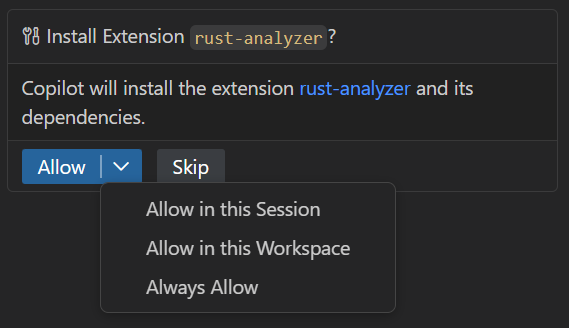
Allow once is the big button; wider trust sits one click deeper
A split button can hold a whole permission ladder while making only the narrowest rung the reflex click.
Split-button approval
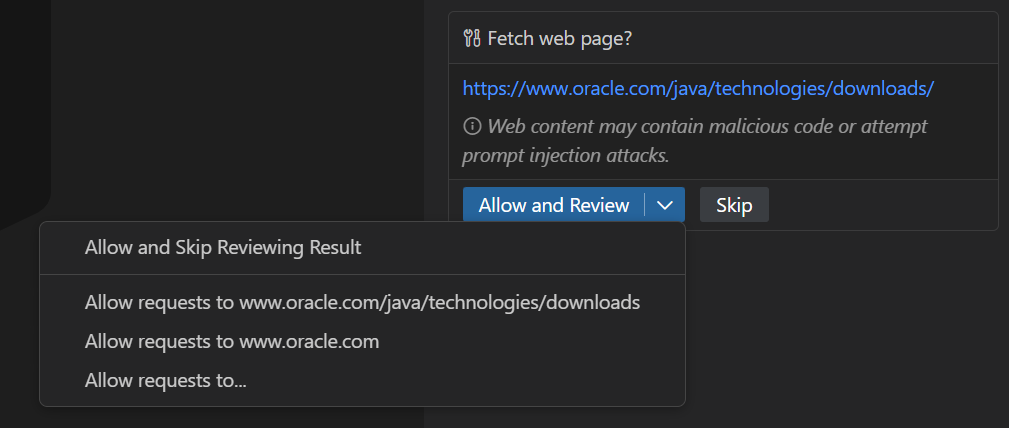
Two approvals for one fetch: going out, and coming back in
Split consent where risk changes direction: contacting a site risks data going out; using its reply risks instructions coming in.
Split request/response approval
Agent wants to edit 2 files
src/components/Button.tsx
Ask for permission by place, not by time
Scoping trust to where a change lands, not how long trust lasts, turns a recurring interruption into a single, legible decision.
Pre-execution approval